You paid for it. So why is your device showing ads?
Samsung Family Hub refrigerator ads, Jeep dashboard messages and Windows 11 lock screen promotions are turning paid devices into billboards.
Samsung Family Hub refrigerator ads, Jeep dashboard messages and Windows 11 lock screen promotions are turning paid devices into billboards.
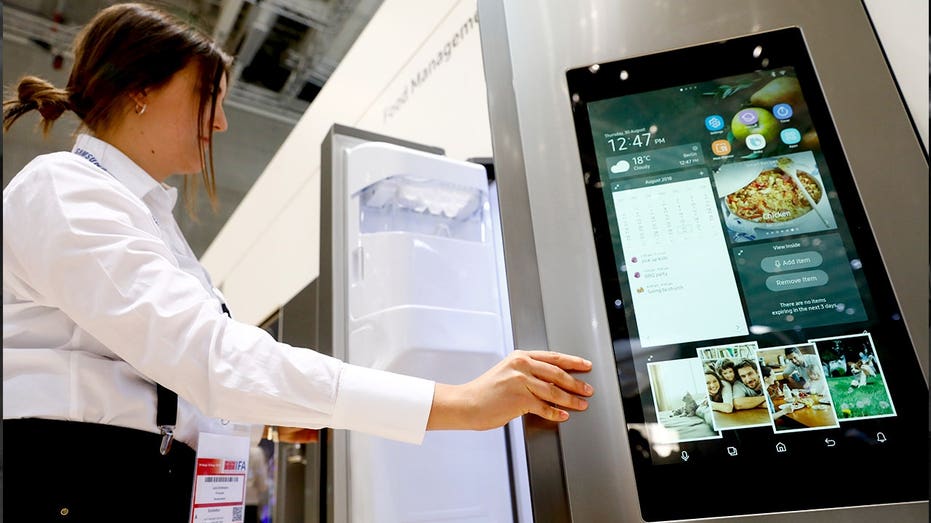
You paid for the product. So why does it feel like the company still controls the screen? That is the question more of us are starting to ask as smart devices get updated long after we bring them home. A refrigerator can show ads in your kitchen. A car can flash offers on the dashboard. Even a Windows 11 computer can surface promotions before you get to work.
The frustrating part is that this often happens through software updates. You tap update because you want your device to stay secure and work properly. Then one day, the product you bought starts acting like a billboard. This is also why it pays to understand the hidden privacy clauses and settings that come with smart products before those screens start doing things you never expected.
GOOGLE TURNS OLD PHONES INTO CLOUD SERVERS
Free live CyberGuy class: Sick of Spam? Join us July 22.
Join us Wednesday, July 22, at 1 p.m. ET for a free CyberGuy Live class that will help you cut down on robocalls, spam texts, junk email and other unwanted messages. Kurt "CyberGuy" Knutsson will walk you step by step through simple ways to filter spam, clean up your inbox and recognize the messages that could put your personal information at risk. No technical experience is needed. You’ll also receive our spam-stopping checklist, and every registrant will get a link to the class recording afterward.
Reserve your free spot today at CyberGuyLive.com.
Samsung Family Hub refrigerators are sold as connected kitchen hubs. You can use the screen for weather, calendars, grocery lists and other household features. But as we discussed on The CyberGuy Report podcast at CyberGuy.com, that same screen can also become a place for ads after a software update. Samsung began showing ads on some Family Hub refrigerator Cover Screens in the U.S. We reached out to Samsung about this, and a spokesperson provided us with this statement:
"Last year, Samsung piloted a new Cover Screen widget on Family Hub refrigerators in the U.S. The widget rotates through useful information like weather, news, calendar events, and curated ads. After the pilot concluded in March, the widget was launched fully with the same user experience.
Users can turn off the Cover Screen widget, including ads, in the Advertisements tab of the Settings menu (Settings > Advertisements > Cover screen Ads) without impacting any other features or functions. Ads can also be dismissed on the Cover Screens where shown, meaning that the dismissed ad will not appear again during that specific ad's campaign period. Since the start of the pilot program last October, our review has indicated consumers are finding value in this new widget. The percentage of users who have turned off the feature is in the low single-digits.
A Cover Screen appears when the Family Hub screen is idle, and the widget only appears on the Weather, Color, and Daily Board themes. The widget does not appear on the Cover Screen's Art or Album themes."
That answer is important because Samsung says you can turn the Cover Screen ads off without losing other features. Still, the larger point remains. You bought a refrigerator, then a later update added an ad experience to the screen in your kitchen.
On the Family Hub screen:
You can also change the Cover Screen theme. Samsung says the widget does not appear on Art or Album themes.
Now move from the kitchen to the driveway. Some Jeep, Ram and Chrysler drivers previously saw promotional messages on their infotainment screens through Stellantis' Uconnect system.
Stellantis, the automaker behind Jeep, Ram, Chrysler and Dodge, says its In-Vehicle Message technology, or IVM, is designed to help the company stay in contact with owners at important points during ownership. The company says it uses IVM for important messages, such as vehicle recalls and vehicle health monitor alerts. Stellantis also confirmed that the earlier pop-up promotions were part of its in-vehicle messaging or Uconnect communication system. However, the company says it has not run the promotional in-vehicle messages referenced in those reports since mid-fall 2025 and has nothing planned for future in-vehicle promotional messages.
At the time those promotional messages were active, Stellantis says owners could opt out by calling customer service or by updating their profile or Message Settings on their vehicle brand's website account, such as a Ram owner account. That update is important. There are no current promotional in-vehicle messages to opt out of, according to Stellantis. Still, the larger concern remains: modern vehicles are software-driven, and the screen in the middle of your dashboard can be changed long after you drive off the lot.
10 SMALL HOME UPGRADES THAT CAN LOWER YOUR MONTHLY BILLS
A car screen is different from a phone app or website. You use that display for directions, music, climate controls and vehicle settings. So when a promotional message appears there, it can feel more personal than an ad on a webpage.
To be fair, in-vehicle messaging can serve an important purpose. Recall notices and vehicle health alerts can help owners respond to safety or maintenance issues faster.
However, promotional messages hit differently. You are sitting in a car you paid tens of thousands of dollars for. That screen should help you drive, maintain your vehicle and get where you are going without feeling like another place for a sales pitch.
Then there is your computer. Windows 11 can show promotional content in places that feel like part of the operating system. That includes the lock screen, the Start menu and account-related notifications.
The lock screen can use Windows Spotlight, which displays rotating images along with tips, tricks and notifications. Start menu settings also include areas where Microsoft can show recommendations and account prompts.
Some of these messages may look like helpful notices. Others can feel like upsells. The most annoying ones are the alerts that look urgent, then steer you toward a Microsoft service such as OneDrive backup. Microsoft declined to comment for this story.
You can cut down on much of this in Settings.
FIVE DATA BROKER OPT-OUT MYTHS THAT LEAVE RETIREES EXPOSED
Microsoft may change wording over time, so look for anything tied to recommendations, tips, suggestions, offers or account notifications. For more Windows settings help, see these Windows 11 tips.
The real problem isn’t one ad on one screen. It is the fact that software gives companies a way to change products after you buy them. A refrigerator used to stay a refrigerator. A car dashboard used to do what it did on the day you drove off the lot. A computer operating system used to feel like the tool you used to get things done.
Now those screens can change later. A company can add a widget, promote a service or push an offer through an update. That does not mean every update is bad. Security fixes are essential. Bug fixes help. New features can be useful. However, ads feel different when they arrive after you already paid for the product. That is why you should keep your devices updated, but also check what changed after the update installs.
Before you buy a smart appliance, connected car or computer, think beyond the hardware. Ask what kind of software controls the screen. Check whether ads, recommendations or promotional content can be turned off.
After setup, go through the settings before you assume the default experience is the only option. Look for menus labeled ads, recommendations, notifications, tips, offers or personalization. If you are setting up a new device, this new electronics setup guide is a good place to start.
Also, pay attention after updates. If a new widget or pop-up appears, do not assume you have to live with it. There may be a buried toggle that turns it off. Most of all, remember that a screen in your home, car or office has value. Companies know that. You should know it too.
This is exactly why we covered this on The CyberGuy Report podcast at CyberGuy.com. It hits a nerve because you already paid for these products, yet companies can still use software updates to claim space on the screens you see every day. Samsung says Family Hub Cover Screen ads can be turned off. Stellantis says its vehicle promotions stopped in the fall of 2025. Windows 11 gives you some settings that reduce tips, suggestions and account prompts. Still, the pattern is hard to ignore. Companies are learning how to keep making money from a product after the sale. That may be great for them, but it can feel pretty lousy when the screen is inside your kitchen, your car or your computer. When you pay thousands of dollars for a product, that screen should work for you instead of becoming another place for a company to sell to you.
Which screen ad would bother you most: one on your refrigerator, one on your computer or one in your car? Let us know by writing to us at CyberGuy.com.
Sign up for my FREE CyberGuy Report
Copyright 2026 CyberGuy.com. All rights reserved.
This story was first published by Fox News - Latest. Read the original report
We use cookies to run this site and, with your consent, to measure traffic and improve our content. Necessary cookies are always on. You can accept all cookies or choose which ones to allow. Privacy policy.