


Security Bite: iOS 27 now lets apps ask your iPhone if you’re being scammed
9to5Mac Security Bite is exclusively brought to you by Mosyle, the only Apple Unified Platform. Making Apple devices work-ready and enterprise-safe is all we do. Our unique integrated approach to management and security combines state-of-the-art Apple-specific security solutions for fully automated...

9to5Mac Security Bite is exclusively brought to you by Mosyle, the only Apple Unified Platform. Making Apple devices work-ready and enterprise-safe is all we do. Our unique integrated approach to management and security combines state-of-the-art Apple-specific security solutions for fully automated Hardening & Compliance, Next Generation EDR, AI-powered Zero Trust, and exclusive Privilege Management with the most powerful and modern Apple MDM on the market. The result is a totally automated Apple Unified Platform currently trusted by over 45,000 organizations to make millions of Apple devices work-ready with no effort and at an affordable cost. Request your EXTENDED TRIAL today and understand why Mosyle is everything you need to work with Apple.
Last week, Apple officially released iOS 27 to everyone. The update comes with many new security features, which is nice given how lackluster iOS 26 was in that area. However, there’s one new anti-scam feature in particular that targets an area Apple has never explored before and could eventually be massively beneficial to users. The feature is called Impersonation Risk Detection.
All in all, it’s meant to catch users in the middle of a scam.
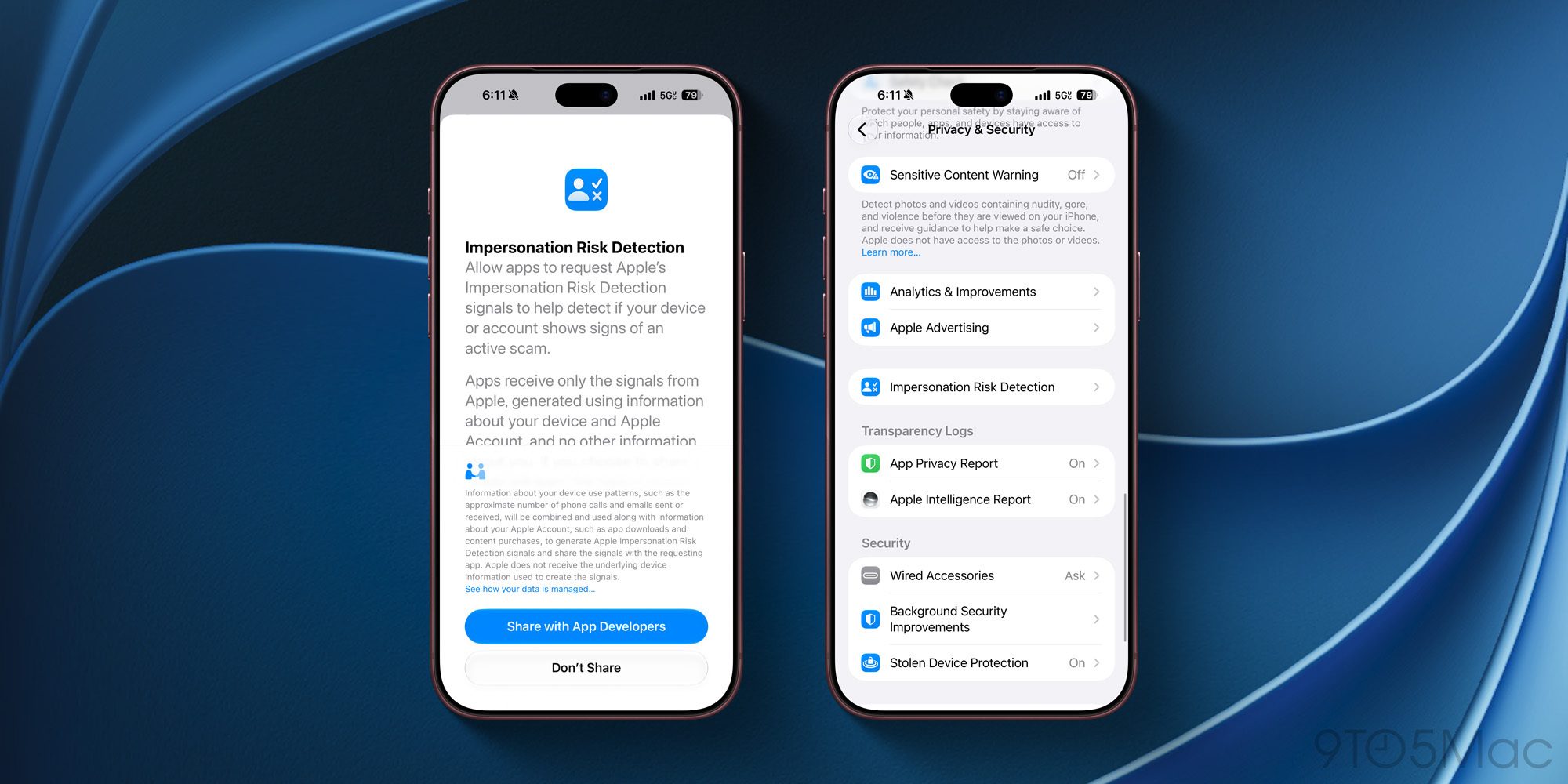
There are many different scenarios in which this feature could be triggered, but one of the more likely ones is a threat actor posing as a bank’s fraud department and walking a user through moving money into a “safe account” or resetting their password. Types of situations where security features like Face ID and two-factor authentication aren’t much help.
When in a supported app (it’s unclear which apps offer support yet, but I doubt it’s many), and you do something like send a payment or change your account password, the app can now ask your iPhone for a read on the situation. iOS 27 will then look at previous interaction patterns, timing, context, and even basic sensor data to determine whether the actions taken are legitimate.
According to Apple, Impersonation Risk Detection doesn’t look at content in Photos, Messages, or Mail for context. The feature doesn’t look at the point of intrusion. And the only thing an app receives is a single word: “Unknown,” “Medium,” or “High.” Unknown means nothing was tripped, which Apple is careful to note is not confirming you’re safe.
Now, it’s important to note that if there is a Medium or High flag, iOS doesn’t freeze the money transfer or block the password change. It doesn’t even throw up a system alert. Apple hands the app the risk level and leaves it to the app developer to determine what to do next. This could be making the user verify their identity again or adding some kind of delay before a user is able to change critical settings.
Apple also says it doesn’t control or determine what an app does with the flag, so one app might treat a Medium risk level differently than another.
Users can also keep tabs on this feature in settings under recent activity. It shows which apps have requested a risk assessment and what action triggered it. Users can revoke access per app from there as well.
Now, here’s a major shortcoming, and something that Apple could easily fix.
If you’re reading this, you probably should enable it, but probably don’t need to. My gripe is that Apple shipped the feature off by default, about four taps deep in Privacy and Security within iOS 27 Settings, behind a toggle labeled “Share with App Developers,” which sounds like something you would want to avoid. Put simply, anyone who finds this toggle probably didn’t need it. The people who do need it will never go looking for it.
It needs to be enabled by default.
That said, props to Apple for implementing a 24-hour delay before the feature turns off. If a threat actor is walking a victim through turning off Impersonation Risk Detection mid-phone call, they’ll have to wait at least a day. It’s sort of the same logic behind Stolen Device Protection’s security delay.
You can go turn it on within Settings > Privacy & Security > Impersonation Risk Detection > Share with App Developers.
What do you think about this new iOS 27 security feature? Will this actually be as useful as I think it will be in the future? Let me know in the comments.
Security Bite is 9to5Mac’s weekly deep dive into the world of Apple security. Each week, Arin Waichulis unpacks new threats, privacy concerns, vulnerabilities, and more, shaping an ecosystem of over 2 billion devices. Every other week on the Security Bite Podcast, he sits down with experts in the field to break down the most pressing topics.